Categories
Design Misc Urban papercraft

What about SVG files?

Previous post I wrote some vector files but not the kind you are used from me.
Usually I use .PDF but in the case I use .SVG files, and you want to know what that is about…

What is a .SVG file?

Wikipedia on this subject: http://en.wikipedia.org/wiki/Svg

Scalable Vector Graphics (SVG) is a family of specifications of an XML-based file format for describing two-dimensional vector graphics, both static and dynamic (i.e. interactive or animated).

The official info can be found here: http://www.w3.org/Graphics/SVG/

Scalable Vector Graphics (SVG)
XML Graphics for the Web

What is useful about this file?

It’s very small, most modern browsers can show it and vector edit programs like (online) Aviary Raven (press create and file > import files) or offline Inkscape or Illustrator.

Why doesn’t use everybody this in the papertoy scene?

There is no uniform way to show it in a blog post; every browser works different. I haven’t worked with it a lot and there seem to be some problem with fonts embedding (can also be my inexperience). And people are used to .PDF and viewing files in Adobe Reader (or another .PDF viewer). Another “problem” is that WordPress (this blog runs on it) doesn’t recognize a .SVG file as an image (it labels it as a dangerous file!!)

Example

Business holder template

Download the template as .SVG (use “Save Link As…”)

Business stand (simple) template

Download the template as .SVG (use “Save Link As…”)

If you don’t see any images, you probably using old browser.
I have tested this in Firefox 3.6 (OSX and XP), Google Chrome (XP) and Internet Explorer (XP)

How to create or change a .SVG file?

There is a Firefox addon: svg-edit. This can be used for creating files but you can’t open them yet (net version will) so you have to open a .SVG file in a text editor (like notepad++) and copy paste it.
There is an awesome project online called Aviary that also has a vector edit web application: Aviary Raven. You first need op press “create” and then it’s possible to import a file (file > import files). You can also use Inkscape (freeware) or Adobe Illustrator ($$$).

How to download?

Use “save as” on a link or “save this page” if you have clicked on the link.
Make sure that the file you want to save, end with the extension .SVG (Firefox save this file as a .XML file for example)

How to open?

Use Aviary Raven (press create and file>import files), Inkscape or Illustrator.

How to print?

You can print from Firefox: open the link and print.
Are you used to .PDF files? Save the .SVG files (link) to your hard drive and visite www.fileformat.info and convert .SVG to a .PDF (remember to save the file as .PDF : in my case it change the extension to .HTM)

Should everybody start using SVG files?

Yes and no: yes because they are very small and most of the modern browsers can show the image…. but sadly not in a page/post which makes as difficult to use as .PDF.
And .PDF is what people know… It will probably get bigger if Firefox will treat .SVG files as an image file like Google Chrome and Safari does.
Categories
Design Urban papercraft

Papertoy bizz – part 2

Read my previous post about Papertoy bizz – part 1.

But to be short about it: I’m currently working on making that papertoy bizz somewhat official.

And you need a business card and that got me wondering about some other business card related items:

  • Business card stand
  • Business card holder

I couldn’t resist looking for paper versions of these items.

I used my day jobs business card for this: I think they have a common size use in the Netherlands.
The card is 85mm x 55mm (W x H)

In this post I’ll be focusing on the business card holder!

Business card holder

I found two versions that I want to mention.

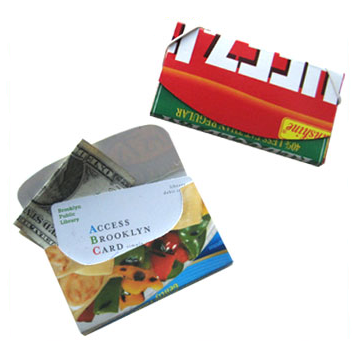
The Food Box Wallet (can be used as business card holder)

The Food box wallet from replayground.com

Business card holder example

I don’t have to vectorized it, because they have a nice .PDF file for us.
Download the template: “save as”

But I did it anyway because it now fits the standard business card:

Download the template as .SVG (use “Save Link As…”)

Placing the elastic can be somewhat difficult so here some extra instructions

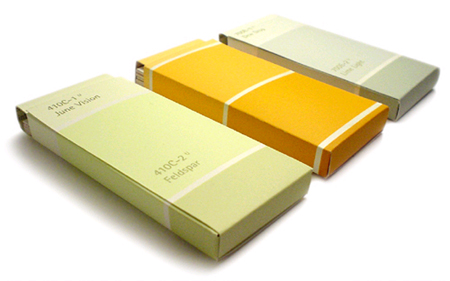
Paint Chip Card Holders!

The other I found at designverb.com
Paint Chip Card Holders
They look awesome don’t they!!
In the Netherlands we don’t have Home Depot or a shop that uses these cards but why don’t use a cereal box or other box made out of carton (or just design one…).

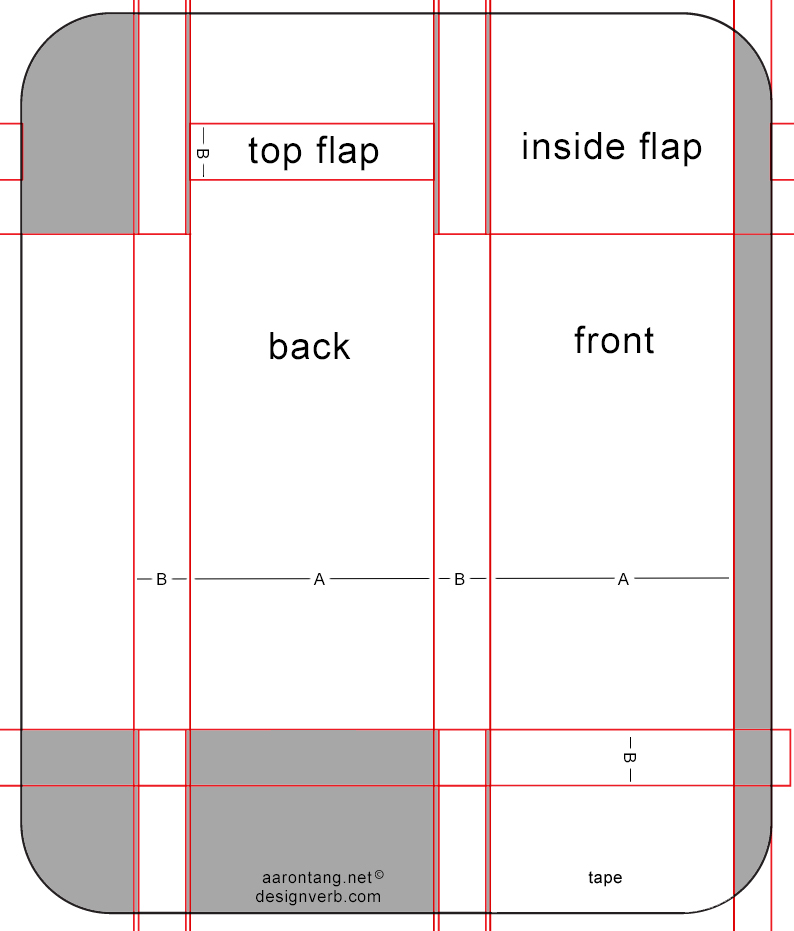
There is a .JPG template
Card holder template
This template can be use to modify it to your own business card dimensions:

To change the size of the template, make ‘a’ the height of your card, and ‘b’ the thickness that you want the card holder to be.

But here is mine vector version:

Download the template as .SVG (use “Save Link As…”)

For building instruction visit designverb.com page about the paint chip card holder.

Here the vector files:

Business wallet template

Download the template as .SVG (use “Save Link As…”)

Business holder template

Download the template as .SVG (use “Save Link As…”)

Categories
Uncategorized

Twitter Weekly Updates for 2010-03-20

Categories
Design Urban papercraft

Papertoy bizz – part 1

I’m currently working on making that papertoy bizz somewhat official.
So I’ve started a business (eMCeeKay.nl <-- not a lot to see there yet) with a officials KvK (Kamer van Koophandel = chamber of commerce) etc….

And you need a business card and that got me wondering about some other business card related items:

  • Business card stand
  • Business card holder

I couldn’t resist looking for paper versions of these items.

I used my day job business card for this: I think they have a common size use in the Netherlands.
The card is 85mm x 55mm (W x H)

In this post I’ll be focussing on the Business card stand!

Business card stand

Simple business card iPhone iPod stand

This one is so simple that I didn’t search further
End result Business card stand from a business card
I found it on instructables.com so visit them for the whole story.

But I need vector files, not just a sketch! So I converted the instructions into a vector file:

And now the download: this is a little experiment so hope it works:
Download the template as .SVG (use “Save Link As…”)
Use the standard functionality from your browser and save it as “.svg” (Firefox will save it as .XML but that file won’t open in Illustrator)

btw: there is even an instruction how to make this stand without a template; just with folding and another business card! Just visit the post and scroll down the comments.

iPhone and iTouch paper stand dock

But then someone pointed me towards this:
iphone-and-itouch-paper-stand-dock
An awesome paper stand from dessinemoiunobjet.com by Julien MadΓ©rou. But I see no reason why we can’t use it for a business card stand.

You can download the original .PDF file here (use “Save Link As…”)

But because we don’t need to have a cord running through, I simplified the template a little bit:

Download the template as .SVG (use “Save Link As…”)

If you are having problem to build it, visit the original post: Iphone and Itouch paper stand / dock or open the original PDF (here).

Here the vector files:

Business stand (simple) template

Download the template as .SVG (use “Save Link As…”)

Business stand template

Download the template as .SVG (use “Save Link As…”)