Categories
Urban papercraft

Urban papercraft: Shin Tanaka

Shin Tanaka updated his site so check http://shin.co.nr/ out.
And he added T-BOY HOODY to the list of paper toys you can customize or design! Just drop Shin one of the following email in his mailbox: “T-BOY HOODY” , “GRITTY” , and “SPIKY BABY”.

I decided to share a “hobby” of mine (read more about my “hobbies”).

But I will only share the cool part of it: I’m talking about urban papercraft.
The cool customizable paper toys who are similar to that of the vinyl scene.

Shin Tanaka is my favorite (well …. I can’t find a lot of builders who approach papercraft with a urban style). I like the simple shapes he uses to create the figures and that they fit on one pace of paper. But what makes him a genius is the fact that he makes DIY paper toys. And it works…. I want to design one too. So this will be added to my wish list. I especially like the GRITTY.

An example: darkimey X GRITTY

GRITTY darkimey
One of the master himself: QRCOD GRITTY
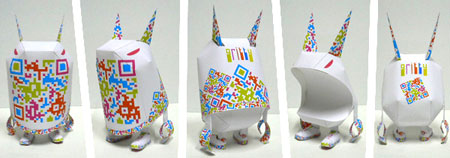
GRITTY QRCODE

So if you have some spare time try one of these: the custom designed paper model collection especially made as a canvas for graffiti writers and designers who want to present their work for public! Or design a SPIKY BABY or GRITTY

Basic Spike from the SPIKY BABY [SERIES 3] – box

SPIKE basic

SPIKE bichorabioso << An example from bicho

The only “comment” I have about Shin that his portfolio-site doesn’t let us see everything he made in the past: he also made some papercraft based on figures from Michael Lau (Michael Lau creates bad ass figures!!): Davy (red), Davy in different colors, SF.M.L.F, and a “Special Paper Model Download Page” in English.

Update #1: An article about Shin Tanaka can be found Pingmag – The Tokoyo-based magazine

Categories
Firefox extensions

Spelling Firefox extensions

As I said before… I’m not a great speller in my native tongue, and I’m even worse in a foreign language!

And I suggested to use tinySpell for people who recognize this problem. The problem with this program is that it only works on Windows and at this moment I’m working on Linux….

So I started to look for a Firefox extension solution.

And the first extension works almost the same as tinySpell:
RiteOfTongueRiteOfTongue – Right-click on a typed word inside a web form to check if the word is spelt correctly and get alternate suggestions if it is wrong. Then select the word from the pop up menu to change it. The words are obtained in real-time over the Internet using the dictionary service from Dict.org.
Downside of the extension is that it checks realtime, so if your internet connection is slow or Dict.org is, your answer (correct or wrong) will come slowly.

The other works like the on line translators like AltaVista Babel Fish, Worldlingo, Systran etc….
ImTranslatorImTranslator – ImTranslator provides additional multilingual capabilities to Firefox for more efficient communication in foreign languages.
Downside of the extension is that is a slow extension with al lot of advertisement in it and when I selected a word I wanted to translate used right click to translate, it disappeared from the textfield….

And one promising extension which doesn’t seem to work with Firefox 1.5 … there is a trick to get “old” extensions to work but I haven’t tested it (read read explanation from ffextensionguru. or perhaps tech.thicke.org)
Wow this is a powerful extension, thx ffextensionguru for helping me on my way.
SpellboundSpellbound – This allows you to spell check forms (e.g. message board posts, blog entries, wysiwyg, etc.) before submitting them.
What even more interesting is the ability check in different language. This extension can also be used to check in my native tongue (Dutch) so check out the language dictionaries available.

These extension are submitted to my frequently used Firefox extensions collection.

Categories
Misc

Some different styles for my logo

mck
mck
mck
mck
mck
mck
mck

Categories
Firefox extensions

Resizeable Textarea firefox extension

Very quickly after I started writing for my blog, I stop using the “EditorMonkey” plugin.
This plugin is a default install with WordPress, which turns the normal WordPress textarea into a WYSIWYG editor using TinyMCE or FCKeditor.

And the that’s the reason I stopped working with it, WYSIWYG editors don’t work like I want them to.

But if you stop using the visual rich editor when writing, you also lose the ability to resize the textarea where you write your post. And that means if you write a long post, you have to scroll up and down, to read what you have writen…. very annoying

I found a nice Firefox extension which fixes this problem:

Resizeable Textarea
Resizeable Textarea extension

A lot of forums and boards provide very smal textareas for new postings.
If you type a longer posting, you have to scroll up and down, to read, what you have writen and to proceed.

Original Resizeable Textarea extension (Firefox 0.9 – 1.0.1)
http://www.extensionsmirror.nl/index.php?showtopic=2796

Same extension but for Firefox 1.5 (0.1b)
http://jeremy.zawodny.com/blog/archives/005752.html

Another extension that is part of my frequently used Firefox extensions collection.

Categories
Firefox extensions

Firefox Extension Backup Extension

Another extension that is part of my frequently used Firefox extensions collection.

FEBE
Firefox Extension Backup Extension (FEBE)

FEBE allows you to quickly and easily backup your Firefox extensions. In fact, it goes beyond just backing up — It will actually rebuild your extensions individually into installable .xpi files. Now you can easily synchronize your office and home browsers.

FEBE backs up your extensions, themes, and (optionally) your bookmarks, preferences, cookies. and much more

There is realy not more to say about this extension. I find it very usefull to have the same tools that I use at work, also at home.