Revolvrr papertoy

I have been busy… Not really with my papertoys

But this one is just so you don’t forget me:
Say hello to my little friend

Revolvrr is a papertoy that I made as a part of an other papertoy.

Nick Knite and Dolly Oblong advised me to share it with you. So here it is: it’s only a blank version because it just doesn’t need more.

The .ZIP file contains a .PDF
(You can use freeware like FilZip or 7zip to extract a .ZIP-file and read a .PDF with Acrobat or Foxit)

There was some room left on the template so I made a bullet for the Revolvrr :D

Update #1: in 48 hours more than 500 downloads. Everybody needs protection. So don’t bring a scissor to a papertoy fight!
Update #2: in 6 days more than 1000 downloads. Throw your guns in the air.
Update #3: 12 days and 1400 downloads. To protect and serve…

Tip from Methuup da Funky One: Glue the curved piece of the cylinder in first, apply glue and push the 4 half moons with the tabs which form the top and bottom of the cylinder from the inside into place.

Update #3: the first Revolvrr customs are here:

70′s Lurrv Gun – Methuup da Funky One custom
custom by Methuup da Funky One

Water Pistol ‘Revolver’ – Jason Bolt custom
Water Pistol 'Revolver' - Jason Bolt custom

Revolvrr custom – Anonymous
Revolvrr custom - Anonymous

How to do this?

The first you need is a piece of paper with a print/pattern on it. Try Google for a pattern.
You can buy paper with a print on it but you can also use a page from a comic/magazine/flyer.
After that you just print the blank template on it.

Oh no!!!

The first papertoy suicide? A sad way to end your birthday… how will this end…
And remember: Revolvrr’s don’t kill people, scissors do!

Deksta having a morbid sence of humor
(No papertoy fan(s) where hurt during this photo session)

  • del.icio.us
  • NewsVine
  • Reddit
  • StumbleUpon
  • Technorati
  • Digg
  • email
  • Hyves
  • Facebook
  • Google Bookmarks
  • MySpace
  • LinkedIn
  • Twitter

Related posts

Twitter updates on my blog will be removed

If you want to see what I’m doing (on Twitter) follow me. But I will not update my weekly tweets here anymore (and remove the once that are here).

It looks kinda ugly, I thought it would be better then posting nothing for weeks in a row.. but it’s not :(

Follow MatthijsKamstra on Twitter

  • del.icio.us
  • NewsVine
  • Reddit
  • StumbleUpon
  • Technorati
  • Digg
  • email
  • Hyves
  • Facebook
  • Google Bookmarks
  • MySpace
  • LinkedIn
  • Twitter

Related posts

Papertoy diamond ring

A papertoy that I did a while back.

Papertoy diamond ring

This papertoy is a gift for someone who creates jewelry (check out the quick website I did for her: Smederij in Amsterdam).

She complains that nobody gives her jewelry. So I created a BIG-diamond ring :D

Papertoy diamond ring + box

Visit my Flickr account for more images

  • del.icio.us
  • NewsVine
  • Reddit
  • StumbleUpon
  • Technorati
  • Digg
  • email
  • Hyves
  • Facebook
  • Google Bookmarks
  • MySpace
  • LinkedIn
  • Twitter

Related posts

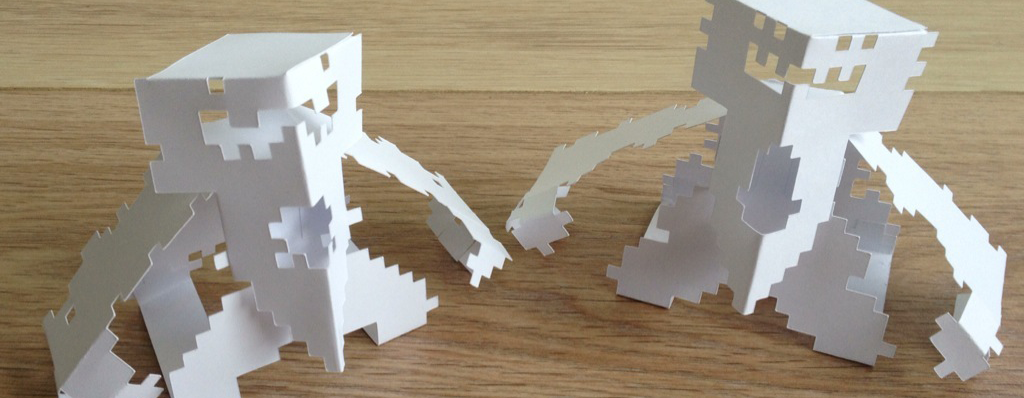
Papertoys Monsters

I finished this models a while back, but never posted about them…
really sad that I didn’t because they are awesome :D

Scorpion Robot
Scorpion Robot

OctoBeak
Monster OctoBeak

They are papertoy monster made for the Monsterbook by Workman Publishing Co.
You can preorder it at Amazon:

Papertoy Monsters: Make Your Very Own Amazing Papertoys! .

There are 50 monsters in this book made by 25 designers. We were given the task to create monster papertoys on one piece of paper, with double-sided prints. They also asked to do some “classic” monster: I did a robot and a fictional monster.

Check my flickr account for more images!

  • del.icio.us
  • NewsVine
  • Reddit
  • StumbleUpon
  • Technorati
  • Digg
  • email
  • Hyves
  • Facebook
  • Google Bookmarks
  • MySpace
  • LinkedIn
  • Twitter

Related posts

Create SWC library from FDT

I use Greensock Tweening Platform a lot, it awesome. Download it (here for example) and you have everything you need.

Now I start working with SWC files and they are so compact: I love it.
But how do you get a library in a SWC? Google has an answer but it’s very complex.

The best answer is from Bruno Fonzi on

Twitter / Bruno Fonzi: How to create SWC librarie ….

How to create SWC libraries from FDT:
Right click Project > Run as > FDT Library
or
Menu > Run Configurations > Create new FDT Library

So start with a New Flash Project (the name you will use for this project will be the name of the SWC: in my case “Greensock_Tweening_Platform”) and copy the com folder from the Greensock ZIP into the src (of source) folder.

If you follow the instructions and create a SWC you will get an error about: UIComponent and Vector (depends on your Project properties).

So to fix this: follow the 2 red x’s

com > greensock > loading > display > FlexContentDisplay
I don’t use this one, so delete.

The next depends on the project properties (I used SDK: Flex 3.3 and Player Version 9 and there are no Vectors in Player version 9)
com > greensock > plugins > EndVectorPlugin
I can’t use this one, so delete this on too.

Create the SWC again and your done: you have one file with the Greensock Tweening Platform in it.

  • del.icio.us
  • NewsVine
  • Reddit
  • StumbleUpon
  • Technorati
  • Digg
  • email
  • Hyves
  • Facebook
  • Google Bookmarks
  • MySpace
  • LinkedIn
  • Twitter

Related posts

FDT and ANT – part 1

Just started to work with FDT and wrote about my “troubles” (post#1 and post#2) with my transition from FlashDevelop.
(have to be very carefull what I say: “they” are watching me: here and here :D )

And it seems to be a very natural (geeky) thing to learn about ANT.

And where do you go to learn about ANT and SWF/Flash/FDT? (Google?)
After some tinkering all I got was: failed to create task or type fdt.launch.application

This post was very useful: FDT and ANT | A User’s Guide – Part I by Alan Klement.
Watch the videos (I’m not very fond of tutorial videos but in this case; they get the job done).
What I love about the “Video I: Getting Started” is the fact that it builds up from scratch. So watch this video when you want to know about ant-files/xml, how to open the ANT-View, how to open/execute an ANT-file.

The second video (Video II: Compiling a SWF) was what I really was looking for: how to export a SWF. Very nice because it starts from scratch.
And it gave me the answer I was looking for: why didn’t my ANT-file didn’t work (it about 3/4 of the video):

BUILD FAILED
[blabla]\source\a\example\build\build.xml:17: Problem: failed to create task or type fdt.launch.application
Cause: The name is undefined.
Action: Check the spelling.
Action: Check that any custom tasks/types have been declared.
Action: Check that any / declarations have taken place.

Solution is very simple, but if you don’t know, you will hate FDT and really it’s not it fault:
Goto the green “play” button with the brown bag, in the toolbar (one picture says more than a thousand words:)

Select the ANT-file you want to change (I have only one :D ), goto to tab “JRE” and change the Runtime JRE to Run in the same JRE as the workspace and your done:

Very useful are the ANT-snippets and ANT-Build-template!
Download (created by Alan Klement) and “install” the ANT-template (how-to on this page but here the short version)

To add XML files templates go: Preferences > XML > XML Files > Editor > Templates and click import.

To add Ant snippets go: Preferences > Ant > Editor > Templates and click import.

I haven’t seen the second part of this tutorial: FDT and ANT | A User’s Guide – Part II but I will.
It seems to be focused on the use of the templates and snippets.

source:
FDT and ANT | A User’s Guide – Part I
FDT and ANT | A User’s Guide – Part II

  • del.icio.us
  • NewsVine
  • Reddit
  • StumbleUpon
  • Technorati
  • Digg
  • email
  • Hyves
  • Facebook
  • Google Bookmarks
  • MySpace
  • LinkedIn
  • Twitter

Related posts

Missing in FDT after working with FlashDevelop

I love FlashDevelop but moved to FDT (read my other post about this subject)…
Not an easy thing (the biggest problem is that it totally not intuitive ) to do and I’m missing some stuff that I had in FlashDevelop.

CTRL+U to change the selected text to uppercase

CTRL+SHIFT+1 to “Promote member to class”

(there is a similar way to do this in FDT but not the same)

CTRL+SHIFT+Q to create a block comment
It is in FDT but I can’t get it to work so you have to work with CTRL+7 (toggle comment) which is a minor adjustment.

The auto-completing FlashDevelop is awesome!! With some tinkering (info here) you can get FDT in the same room but it’s still not the same. I’m used to write private variable with a prefix “_” (example: _variableName). When I want the variable name to autocomplete in FlashDevelop I just type variableName (without the “_” prefix because it stupidly positioned on the keyboard) and it will find it. In FDT you need to start with the prefix “_” otherwise it will ignore the variable name… why???

Also missing: Explore (Open “Project Manager” and right-click on a folder)
(can’t find it in FDT)

But I shouldn’t complain, there is a reason why I’m changing to FDT

Big plus from FDT:
CTRL+SHIFT+F to Format code which is not possible in Flashdevelop
SWC Browsing is limited in FlashDevelop
Cross Platform: FlashDevelop works only on Windows
Refactor: this is so awesome (and expensive!!!)

source:
http://blog.flashmech.net/2008/08/review-fdt-vs-flashdevelop/

  • del.icio.us
  • NewsVine
  • Reddit
  • StumbleUpon
  • Technorati
  • Digg
  • email
  • Hyves
  • Facebook
  • Google Bookmarks
  • MySpace
  • LinkedIn
  • Twitter

Related posts

Moving from FlashDevelop to FDT

Yes, its time, I need to…
So how to make the transition from FlashDevelop to FDT as easy as possible?

Let FDT react like FlashDevelop

And I don’t even have to break a sweat: the amazing Steven Sacks (creator of Gaia) wrote an article about it: read here.
The only two thing that I’m using are:
Open Window > Preferences

Under FDT > Editor > Code Assist copy and paste this into Auto activation triggers for AS, and set the delay to 0ms (zero).

abcdefghijklmnopqrstuvwxyz_. :

and

Under Problems > AS3 Problems:
Unresolvable > Unresolvable variable reference in E4X and Unresolvable member reference in dynamic object should both be set to Disabled (from Warning to Disabled).

The shortcuts I just left them as they where: I’m working in another program so I should use the shortcut given by that program.

Update #1: hmmm I noticed that I can’t live without CTRL+ENTER…. explanation here: Using CTRL-ENTER to compile ActionScript code in FDT. So now I have CTRL+ENTER and debug run: CTRL+SHIFT+ENTER :D

short explanation (so I can do this quickly if something happens to FDT):

Under Preferences > Run/Debug > Launching at the bottom at Launch Operation: Select “Always launch the previously launched application

then

Under Preferences > General > Keys find (or type in “type filter text” – searchbox: “last”) a command called “Run Last Launched” and click Copy Command. Assign (binding) the shortcut CTRL-ENTER to the copied command and change “when” to Editing ActionScipt Source (no spelling mistake: it really says that).
Do the same thing for the “Debug Last Launched” command and assign the shortcut : CTRL-SHIFT-ENTER and change the when to Editing ActionScipt Source.

I’m not sure if the stuff I wrote here is only for FDT4 but the way it was explained on the site previous mentioned didn’t work in FDT4

Some templates/snippets that are very useful

I used this plugin for my trace in FlashDevelop, so how to do this in FDT?

Update #2: I shouldn’t forget to mention CTRL+0 (read the shortcut list for FDT) which is the shortcut for “Quick Trace”. This one I use to trace variable for example and the trace template below for functions.
Update #4: This is really a reminder for myself, but if you need it you know where you can find it in FDT4.
Some minor adjustments like:

Preferences > FDT > Build Path change Source folders to “source” (I like source above src) and Output folder to “deploy” (I like deploy above bin)

Preferences > FDT > Code Style > Code Templates (Misc) to “Override System UserName – ${user}

Preferences > FDT > Editor goto “Folding” and uncheck “Folding enabled” (I like to see everything, comment also)

Preferences > FDT > Tools > Flash/Flash Help to add paths to Flash (in my case: “H:\Program Files\Adobe\Adobe Flash CS4\Flash.exe”) and the Flash help files (in my case: “H:\Program Files\Adobe\Adobe Flash CS4\en\First Run\HelpPanel\Help”)

Preferences > General > Web Browser change to “Use external Web browser” to my favourite browser: Firefox (no Google Chrome there yet)

You have to create a code-template/code-snippet:
go to Preferences > FDT > Editor > Templates

This is a template that resembles the trace I used in FlashDevelop
Trace:

trace ( "+ ${enclosing_type}.${enclosing_method}() - args: " + [ ${enclosing_method_arguments} ] );

and I found some other useful templates

Public method:

public function ${methodName}():${type} {
    trace(">> ${enclosing_type}.${methodName}() args: "+[]);
    ${cursor}
};

for some strange reason there is no shortcut for asdoc :(

ASDoc:

/**
 * ${cursor}
 * @example
 * @param		${enclosing_method_arguments}
 * @return
 */
 */
Update #3: (sadly if there are no param in the function “${enclosing_method_arguments}” will be printed..)

a switch a use a lot with FlashDevelop:

Switch:

switch (${value}) {
	case ${result}:
		trace ("${result}" +${result} );
		${cursor}
		break;
    default:
        trace("case '"+${value}+"':\r\ttrace ('--- "+${value}+"');\r\tbreak;" );
}

and the template for a singleton

Singleton: (from gskinner)

package ${enclosing_package} {

	/**
	* @author ${user}
	*/
	public class ${enclosing_type} {

		private static var _instance:${enclosing_type};
		private static var _allowInstantiation:Boolean;

		public static function getInstance():${enclosing_type} {
			if (_instance == null) {
				_allowInstantiation = true;
				_instance = new ${enclosing_type}();
				_allowInstantiation = false;
			}
			return _instance;
		}

		public function ${enclosing_type}():void {
			if (!_allowInstantiation) {
				throw new Error("Error: Instantiation failed: Use ${enclosing_type}.getInstance() instead of new.");
			}
		}

		${cursor}

	} // end class

} // end package

enough for now, here some other posts about the subject

Source:
http://blog.hydrotik.com/2007/11/19/fdt-30-code-templates/
http://www.breaktrycatch.com/useful-fdt-templates/
http://www.stevensacks.net/2010/04/30/setting-up-fdt-to-look-and-behave-like-flashdevelop/
http://www.gskinner.com/blog/archives/2006/07/as3_singletons.html
http://blog.flashmech.net/2008/08/review-fdt-vs-flashdevelop/
https://fosswiki.liip.ch/display/FLASH/Code+Snippets+for+FDT+and+Flex
http://cote.cc/blog/using-ctrl-enter-to-compile-actionscript-code-in-fdt
http://www.fdt.powerflasher.com/developer-tools/fdt-3/getting-started/shortcuts/
http://blog.flashmech.net/2008/10/fdt-tip-boost-your-code-assist/

  • del.icio.us
  • NewsVine
  • Reddit
  • StumbleUpon
  • Technorati
  • Digg
  • email
  • Hyves
  • Facebook
  • Google Bookmarks
  • MySpace
  • LinkedIn
  • Twitter

Related posts

Straat Papier Holland Klik – Workshop promo

Something that I have been working on:

Straat Papier Holland Klik – Workshop promo from Matthijs Kamstra on Vimeo.

Maarten Janssens create the “Straat Papier Holland Klik”-logo, and did the stop-motion animation. I did the rest

Maarten Janssens (3EyedBear) and me are going to give a papertoy workshop, totally FREE!!
Here more information about the festival:

THE ABC URBAN ARTS FESTIVAL (read more)


A festival where design and crafts go hand in hand.
Saturday 26th, 2010 from 1pm – 6pm the square in front of The American Book Center (Spui 12, Amsterdam, The Netherlands) will be an outdoor atelier, with artists creating work on-site for the public to enjoy.

Maarten Janssens (3EyedBear.com) and Matthijs Kamstra aka [mck] (MatthijsKamstra.nl) will be given a FREE papertoy workshop at ABC treehouse (Voetboogstraat 11, Amsterdam, The Netherlands).

You can meet, greet and craft with the following Dutch Papertoy Artists:

For further information on the ABC URBAN ARTS FESTIVAL please contact :

Rick Lightstone (lightstone45@zonnet.nl) or Donna DuCarme (treehouse@abc.nl)

More info about the festival:
http://www.abc.nl/blog/?p=14118
http://www.facebook.com/event.php?eid=285334500311&ref=ts
http://www.facebook.com/pages/Urban-Arts-Festival/292157415238?ref=ts

  • del.icio.us
  • NewsVine
  • Reddit
  • StumbleUpon
  • Technorati
  • Digg
  • email
  • Hyves
  • Facebook
  • Google Bookmarks
  • MySpace
  • LinkedIn
  • Twitter

Related posts

Papertoy bizz – part 3

I thought I would be finished now, but some random search let me know that I wasn’t finished yet.

So visit my previous post about Papertoy bizz.

But to be short about it: I’m currently working on making that papertoy bizz somewhat official.

And you need a business card and that got me wondering about some other business card related items:

  • Business card stand
  • Business card holder

I couldn’t resist looking for paper versions of these items.

I used my day jobs business card for this: I think they have a common size use in the Netherlands.
The card is 85mm x 55mm (W x H)

In this post I’ll be focusing on the business card holder! (again!)

Business card holder

How to Make a Business Card Holder… From Playing Cards

The fist one is a Business card holder made from playing cards:

How to Make a Business Card Holder... From Playing Cards

Read the craftstylish.com post about that.
Download the template (.PDF) they created here “save as”

I don’t have to vectorize it, but I did it anyway:

Download the template as .SVG (use “Save Link As…”)

Business card holder from Free Patent Online

Here I found another one:
Business card holder

There is only a jpg, so I converted it to the standard size business card and now it’s in vector:

Download the template as .SVG (use “Save Link As…”)

Here the vector files:

How to Make a Business Card Holder… From Playing Cards


Download the template as .SVG (use “Save Link As…”)

Business card holder from Free Patent Online


Download the template as .SVG (use “Save Link As…”)

  • del.icio.us
  • NewsVine
  • Reddit
  • StumbleUpon
  • Technorati
  • Digg
  • email
  • Hyves
  • Facebook
  • Google Bookmarks
  • MySpace
  • LinkedIn
  • Twitter

Related posts